Busca - Search

6 de mayo de 2014

Artworks of my BJDs · Ilustraciones de mis BJDs

Part 2 // Part 3

After much consideration, I've decided to upload here my artworks about the characters that represent our BJDs. Many of our BJDs are based on characters I designed many years ago. Some drawings about these characters can be found in my deviantART and my artworks blog, but from now on I'm also going to share them here so you can see them.

By the way, in past Toshi was called as Norlij. At that time the character wasn't as developed as he is now and didn't have a "human" name. Danielle always wore long hair, which changed when she arrived as a BJD. And though sometimes I draw her smiling in her half-vampire form, usually she has a sad touch that can be mistaken by "sweetness", although the character is a manipulative one. As for Maiko, she was a character that it was there but wasn't overly developed and therefore, I barely drew her.

To start, today I'm showing you my oldest artworks, from my "watercolours era":

Part 2 // Part 3

Después de pensarlo mucho, he decidido ir subiendo por aquí los dibujos que vaya dibujando sobre los personajes que representan a nuestros BJDs. Muchos de nuestros BJDs están basados en personajes que diseñé hace muchos años. Algunos dibujos sobre estos personajes podéis verlos en mi deviantART y en mi blog artístico, aunque a partir de ahora también los iré compartiendo por aquí para que los veáis. 

Por cierto, antes a Toshi le llamaba Norlij. Por aquella época el personaje no estaba tan desarrollado como ahora y no tenía nombre "humano". Danielle tenía siempre el pelo largo, cosa que cambió cuando llegó como BJD. Y aunque a veces la dibujo sonriente en su forma de medio-vampira, normalmente tiene un aire melancólico que puede ser confundido por "dulzura", aunque el personaje es un ser manipulador. Y en cuanto a Maiko, era un personaje que estaba ahí pero no estaba muy desarrollado y por lo tanto, apenas la dibujé.

Para empezar, hoy os voy a enseñar mis dibujos más antiguos, de mi época "acuarelas":

Byron, Maiko, Toshi & Danielle (2003) by Diabolikal Lily

4 de mayo de 2014

My Nancy dolls · Mis muñecas Nancy

As this blog is dedicated to my BJDs, they are dolls and I upload photos of my Monster High too, I'll talk about my Nancy dolls.

I have two dolls, a Nancy that I got for my first communion (her communion dress is kept out there, I took it off because I didn't like it) and a Nancy Selene which doesn't have her medallion (lost) and neither her original clothing (damaged and my mother threw it away). The fact is that both dolls were a bit dirty and poorly maintained. I'm a bad person for not having care them as they deserved and let both have their hair and body dirty.

The fact is that is that because of my fondness for BJD's, I learned to see the rest of dolls differently and I wanted to restore my two Nancy dolls.

This is how they were:

Como este blog está dedicado a mis BJDs, ellos son muñecos y también subo fotos de mis Monster High, pues hablaré sobre mis muñecas Nancy.

Tengo dos muñecas, una Nancy que me regalaron por mi comunión (por ahí tiene que estar guardado su vestido de comunión, se lo quité porque no me gustaba) y una Nancy Selene de la que no conservo ni su medallón (se perdió) ni su ropa original (se estropeó y mi madre la tiró a la basura). El caso es que ambas muñecas estaban un tanto sucias y mal cuidadas. Soy una mala persona por no haberles cuidado como se merecían y haber dejado que tanto su pelo como su cuerpo terminasen cogiendo polvo y suciedad. 

El caso es que a raíz de mi afición por los BJDs, aprendí a ver al resto de muñecas de otra manera y he querido restaurar mis dos muñecas Nancy.

Así es como estaban:

Nancy Selene
Face-up made my me · Maquillaje hecho por mí

28 de abril de 2014

Adventurer's Club - April: Exotic animal

Today I'm coming with photos of Nina, my Draculaura. Yes, the doll finally has a name. The reason for this name is very simple: it was the first name that crossed my mind. Later I realized that "nina" means "doll" in Catalonian, so in a way is funny XD

These photos are for the "Adventurer's Club", whose challenge for April is "Exotic animal". The poor little seal is a bit dirty but on second thought, animals aren't very clean and that gives is some realist, lol.
···
Nina has made a new friend, a baby seal.

Hoy vengo con fotos de Nina, mi Draculaura. Sí, la muñeca finalmente tiene nombre. El porqué de este nombre es bien simple: fue el primer nombre que se me pasó por la cabeza. Luego me di cuenta de que "nina" significa "muñeca" en catalán, así que en cierto modo tiene hasta gracia XD

Estas fotos son para el "Adventurer's Club" cuyo reto del mes de abril es "Animal exótico". La pobre foquita está poco sucia aunque pensándolo bien, muy limpios no es que estén los animales y eso le da algo de realismo, jajaja.

···
Nina ha hecho un amigo nuevo, una foquita bebé.


Thanks for your visit! ¡Gracias por vuestra visita! 


25 de abril de 2014

The first anniversary of Shun · El primer aniversario de Shun

Today makes a year of the arrival of Shun. In fact, of his head, although his birthday was last 16th since that's the date shown on his certificate of authenticity. As usual, I have taken some photos to celebrate his first year with me.

Although it wasn't in my plans to have this character or this doll that I bought for the circumstances, I'm impressed for how much I like both the doll like the character, now more developed.

And now, the photos.

Hoy hace un año de la llegada de Shun. En realidad, de su cabeza, aunque el día 16 fue su cumpleaños, ya que es la fecha que pone en su certificado de autenticidad. Así como de costumbre, he hecho unas fotos para celebrar su primer año conmigo.

A pesar de que no tenía pensado tener este personaje ni este muñeco al comprarlo por las circunstancias, me ha impresionado lo mucho que me han gustado tanto el muñeco como el personaje, ahora más desarrollado.

A continuación, las fotos.


P.S.: This is the first shoot I upload since I fixed the problem about authomatic settings. Now photos are like they should be (not so good photo editing is my fault, XD). Even the quality has improved by not having so much pixelated as before. 
P.D.: Esta es la primera sesión que subo desde que solucioné el problema de los ajustes automáticos. Ahora sí se ven las fotos como debe ser (la no tan buena edición fotográfica es cosa mía, XD). Incluso la calidad ha mejorado al no tener tanto pixelado como anteriormente.

Thanks for your visit! ¡Gracias por vuestra visita! 


23 de abril de 2014

Picasa Web, dark and grey photos fixed · Picasa Web, fotos oscuras y grises solucionado

In this post I mentioned that I confirmed my suspicions that Picasa Web darkens photos is true. Anyone who knows me, knows that I investigate to infinite to check for solutions to problems, so I decided to investigate to find out how the hell could prevent that Picasa Web edits my photos as it pleased when I don't want it to do it because I knew that somehow had to be able to do. When I upload photos, first I edit them in Photoshop and when I think that are more or less correct in my knowledge, I upload them and therefore I don't need any other program that would edit them because they're that cool.

After researching, I read in forums and other sites that many people had this problem and couldn't find a solution for it (even I read cases where directly they left their blog for this reason o.O ) until I found a solution for this problem I want to share with you if you have the same problem and you don't know how to fix it. As you know, both Blogger and Picasa Web belong to Google and I have always avoided having an active Google+ account because I don't like social networks and I wouldn't use it. Well, I've had no choice but to active that account only to fix this problem of dark and grey photos because they FORCE YOU to activate a Google+ account if you want to make these changes.

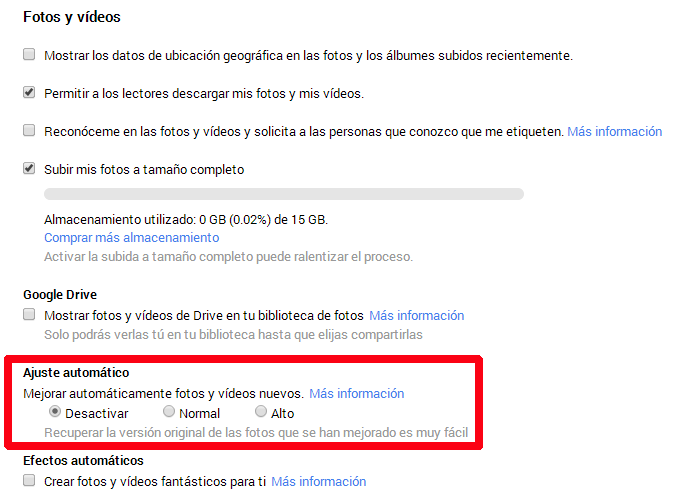
Once you have your Google+ account, go to http://google.com/settings/plus. Done that, search in "Photos and videos" and deactivate the automatic settings. As simple as that the problem of dark photos is fixed in the next photos you'll upload. I have automatic effects disabled as well because I have no idea what it does and as I said before, I edit my photos in Photoshop and I don't need anything that plays with my pics without my supervision. I hope it can helps you. My second choice was to upload all my photos on flickr and I'm using that account to upload some pics only. For my artworks blog I don't accept the option to upload my illustrations on flickr and I wanted to keep using Picasa Web because I find it more comfortable.

By the way, the next capture has the text in Spanish, but I guess settings are the same in English version.
En esta entrada comenté que confirmé mis sospechas de que Picasa Web oscurece las fotos es cierta. Quien me conoce, sabe que indago hasta el infinito para comprobar si hay solución a los problemas, así que decidí investigar para averiguar como diablos podía evitar que Picasa Web retocase mis fotos como le daba la gana cuando no quiero que lo haga porque sabía que de algún modo se tenía que poder hacer. Cuando subo fotos, primero las edito con Photoshop y cuando veo que más o menos están correctas dentro de mis conocimientos, las subo y por lo tanto, no tengo necesidad de que ningún programa ni ninguna página web me vuelva a retocar las fotografías porque son así de guais.

Después de investigar, leí en foros y otras páginas que muchísima gente tenía este problema y no encontraban solución para ello (incluso leí casos en los que directamente abandonaban su blog por este motivo o.O ) hasta que di con una solución a este problema que quiero compartir con vosotr@s por si tenéis el mismo problema y no sabéis cómo solucionarlo. Como ya sabéis, tanto Blogger como Picasa Web pertenecen a Google y siempre he evitado tener una cuenta Google+ activa porque no me gustan las redes sociales y no la iba a usar. Pues no he tenido más remedio que activar dicha cuenta solo para poder solucionar este problema de las fotos oscuras y grises porque sí, te OBLIGAN a activar una cuenta en Google+ si quieres hacer estos cambios.

Una vez que tenéis vuestra cuenta de Google+, entrad en http://google.com/settings/plus. Hecho esto, buscad en "Fotos y vídeos" y desactivad el ajuste automático. Así de simple se soluciona el problema de las fotos oscuras en las próximas fotos que subáis. Los efectos automáticos también lo tengo desactivado porque no tengo ni idea de para qué sirve y como he dicho anteriormente, mis fotografías las edito con Photoshop y no necesito nada que me toquetee las fotos sin mi supervisión. Espero que os sirva de ayuda. Mi segunda opción era subir todas mis fotos en flickr, cuenta que solo utilizo para subir algunas fotos seleccionadas y para mi blog artístico no acepto la opción de subir mis dibujos en flickr y quería seguir usando Picasa Web porque me resulta más cómodo.


For you to see the difference, I show you a photo I uploaded when automatic settings were activated and the same photo with those settings disabled.
Para que veáis la diferencia, os voy a enseñar una foto que subí antes de desactivar el ajuste automático y la misma foto con el ajuste desactivado.

Picasa Web:
Automatic settings activated  · Ajuste automático activado
Picasa Web:
Automatic settings disabled · Ajuste automático desactivado
As you see, the difference is noticeable. What is to say that their automatic settings are a real crap that not only ruins the colours, contrast and brightness of the pic, it also lowers the quality considerably.

Now this problem is fixed, I hope our friends of Google won't annoy after a while with another of their obligatory updates that have not asked permission for to accept because they want to.

Como veis, la diferencia se nota. Lo que viene a decir que sus ajustes automáticos son una auténtica porquería que no solo estropea los colores, contraste y brillos de la fotografía, sino que además le baja la calidad de forma considerable.

Ahora que este problema está solucionado, espero que estos señores de Google no vuelvan a fastidiar dentro de un tiempo con otra de sus actualizaciones obligatorias de las que no me han pedido permiso para aceptarlas porque sí.

Thanks for your visit! ¡Gracias por vuestra visita! 


Blogger Tips and TricksLatest Tips And TricksBlogger Tricks
Related posts Plugin for wordpress, blogger…